


Table of Contents
Last updated: June 2026 · Built for tech job-seekers in India.
Quick answer: Recruiters find you on LinkedIn via keyword search — so optimize your profile like an ATS. The highest-leverage fields: a keyword-rich headline (role + specialization + stack, not just “Software Engineer at X”), a searchable About section front-loaded with your skills, a complete Skills section (recruiters filter by these), and the “Open to Work” recruiter setting (private mode signals availability only to recruiters). A complete, keyword-optimized profile gets meaningfully more recruiter InMails than a sparse one.
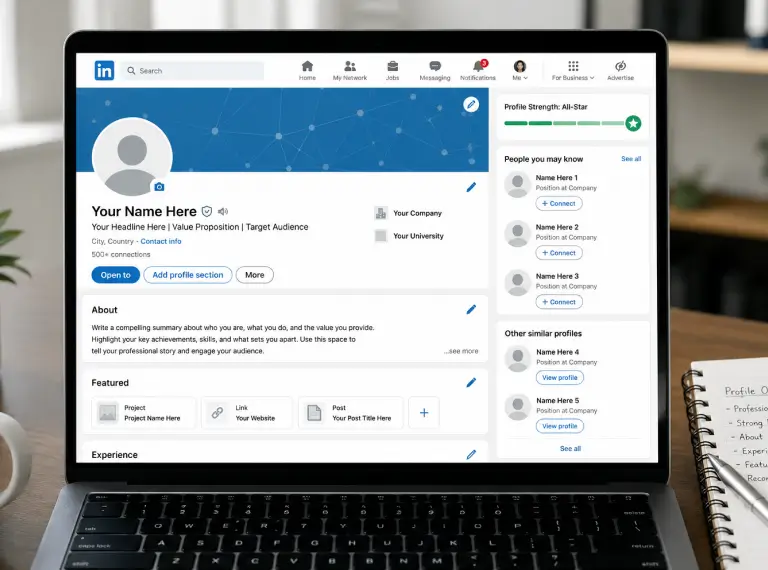
LinkedIn is where recruiters go fishing — they search by keywords, filter by skills and location, and message the profiles that match. If your profile isn’t optimized for those searches, you’re invisible to the inbound opportunities that are often the best ones. This guide shows you exactly how to optimize each field so recruiters find and message you.
How recruiters actually find candidates on LinkedIn
Recruiters use LinkedIn Recruiter, which works like a search engine over profiles. They type queries like “backend engineer Go Kubernetes Bangalore” and filter by skills, location, experience, and availability. Your profile ranks in those results based on:
- Keyword match — do your headline, About, experience, and skills contain the terms they searched?
- Profile completeness — complete profiles rank higher and look credible
- Skills listed — recruiters filter hard on these
- Availability signals — “Open to Work” surfaces you to recruiters searching for available candidates
- Activity / recency — recently active profiles surface more
So: optimize for keywords (like an ATS), complete every section, and signal availability. That’s the whole game.
The headline — your highest-leverage field
Your headline appears everywhere (search results, comments, messages) and is heavily weighted in search. The default (“Software Engineer at Company”) wastes it.
Formula: [Role] · [Specialization/Stack] · [Domain or signal] · [optional: open to work]
Examples:
- Backend Engineer · Go, Kubernetes, Distributed Systems · Fintech
- Senior Data Scientist · ML in Production & GenAI · Ex-Flipkart
- Product Manager · Fintech & Growth · IIM-A · Open to PM roles
- Frontend Engineer · React/TypeScript & Design Systems · 6 yrs
- DevOps/SRE · AWS, Kubernetes, Terraform · CKA Certified
Pack it with the keywords recruiters search for — the role, the stack, the domain. This single change often produces the biggest jump in recruiter InMails.
The About section — front-load keywords
The About (summary) section is searchable and lets you stack keywords naturally. Structure:
- First 2 lines: your role, years, and core strength (this shows before “see more” — make it count)
- Middle: what you build, your key skills and tools (keyword-rich, written naturally)
- A line on what you’re looking for (if job-searching)
- Optional: a brief signal of impact (“shipped systems serving XM users”)
Write it in first person, conversationally — LinkedIn is less formal than a resume. But make sure every skill/tool you want to be found for appears here.
The Skills section — recruiters filter on this
LinkedIn lets you list up to 50 skills; recruiters filter searches by them. Rules:
- List all relevant hard skills (languages, frameworks, tools, cloud platforms, domains)
- Pin your top 3 to the most important for your target role
- Get endorsements on your top skills where you can (they add minor credibility)
- Take 1–2 LinkedIn Skill Assessments for your core skills — the badge is a small positive signal and can surface you in filtered searches
Experience & the rest
- Mirror your resume’s quantified bullets in your experience entries — LinkedIn experience is searchable too
- Use the exact job titles recruiters search (“Software Engineer”, not “Code Ninja”)
- Add a profile photo (yes, LinkedIn — unlike a resume — expects one; profiles with photos get far more views) and a simple banner
- Custom URL (linkedin.com/in/yourname) — clean it up for your resume
- Featured section — pin your portfolio, GitHub, or a standout project
- Location set correctly — recruiters filter by it heavily
The “Open to Work” setting (use the private mode)
LinkedIn’s “Open to Work” has two modes:
- Public (green #OpenToWork photo ring): visible to everyone, including your current employer. Higher visibility, but signals to your network you’re looking.
- Recruiters-only (private): signals availability only to recruiters using LinkedIn Recruiter, not to your network or employer.
For most people quietly job-searching, recruiters-only mode is the right choice — it surfaces you to recruiters searching for available candidates without alerting your current company. This setting meaningfully increases relevant InMails.
Activity — stay visible
LinkedIn surfaces recently-active profiles more. You don’t need to become an influencer; light activity is enough:
- Comment thoughtfully on posts in your field occasionally
- Share the odd useful article or project
- Keep your profile fresh (update it when you ship something notable)
Even minimal, periodic activity keeps you more discoverable than a dormant profile.
Frequently asked questions
How do I optimize my LinkedIn profile for recruiters? Treat it like an ATS: keyword-rich headline (role + stack + domain), front-loaded About section, a complete Skills section (recruiters filter on these), exact job titles, a photo, correct location, and the “Open to Work” recruiter setting. Recruiters find you by keyword search, so match the terms they’ll use.
What should my LinkedIn headline say? Use: role + specialization/stack + domain or signal. E.g., “Backend Engineer · Go, Kubernetes, Distributed Systems · Fintech.” Avoid the default “Job Title at Company” — it wastes your most-weighted search field.
Does “Open to Work” hurt my chances? The public green ring is visible to everyone including your employer; some candidates prefer to avoid it. The recruiters-only mode signals availability privately to recruiters without alerting your network — this is the safer, high-ROI option for most job-seekers.
How many skills should I list on LinkedIn? List all relevant hard skills (LinkedIn allows up to 50), pin your top 3 to your target role, and take a Skill Assessment or two. Recruiters filter searches by skills, so completeness here directly affects discoverability.
Do I need a photo on LinkedIn? Yes — unlike a resume, LinkedIn expects one, and profiles with photos get far more views and credibility. Use a clear, professional headshot.
How do I get recruiters to message me on LinkedIn? Optimize for keyword search (headline, About, skills), complete your profile fully, enable the recruiters-only “Open to Work” setting, keep your location accurate, and stay lightly active. The more complete and keyword-matched your profile, the more relevant InMails you’ll get.
Should my LinkedIn match my resume? The facts (titles, dates, companies) must match exactly — discrepancies are a background-verification risk. But LinkedIn can be slightly more conversational and complete, since it has no one-page limit.
Where to go from here
Optimize your headline and About for keywords, complete your skills, enable recruiters-only Open to Work, and add a photo.
Then:
Browse premium tech roles on Instahyre → — invite-only, and recruiters reach out to you directly, so an optimized profile compounds your visibility.
LinkedIn features and settings change periodically; verify current options in-app.

Aradhye Ackshatt
Content Strategist
Aradhye has been extracting actionable insights from salary data for recruiters in the Indian tech industry for over half a decade, before AI made the job easier! Hence, he has expanded into recruiter enablement via behavior modification workshops. Backed by Instahyre data, he publishes industry-specific salary reports every FY quarter.

More on talent intelligence




Ready to see Instahyre in action?
Ditch the mass emails, job ads, and manual resume screening. Source, Engage and Interview using AI
Get Started for FreeWant to be a part of Exclusive, Invite - only Recruitment events?
Get notified when new stories and insights are released.
You always have the choice to unsubscribe.
